
Release Date: August 21, 2026
Version: 1.0.44
Developer: Unison
Developer Website: https://unison.audio/808-machine
Format: STANDALONE, VSTi, VSTi3, AAX, AU
Bit Depth: 64-bit
Crack: Cracked
System Requirements: macOS, Windows
365.2 MB
Description:
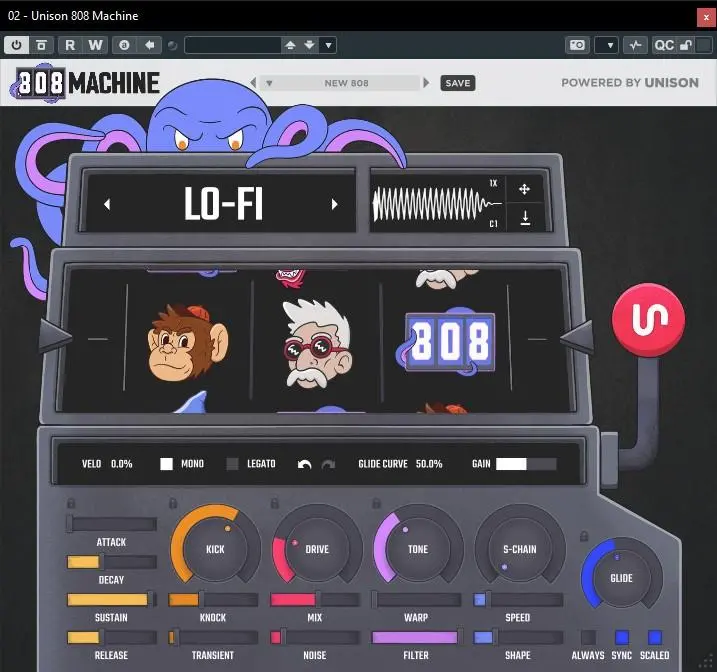
The world’s first (and only) AI-powered 808 sample generator plugin.
Extremely easy to use; sounds great 97% of the time.
Features:
Say goodbye to weak beats forever by having an unlimited supply of powerful 808s at your fingertips.
Get instant inspiration by creating unique 808s with the click of a button.
Simple and intuitive: just 5 main controls, yet offering full customization and professional-quality sound.
Make artists and listeners go wild for your beats, boosting your plays, sales, and industry recognition.
Create your signature sound with custom-made 808s so you can stand out from ordinary producers.
Enhance your music and speed up your workflow with new AI-driven wavetable generation technology.
Using 808 Machine is a breeze:
Select
Choose the style of 808 you want to create.Generate
Click the button to instantly generate a fire 808.Drag and Drop
Drag the new 808 audio file directly into your project or export it for later use.
-
 1
1
-
 1
1
Recommended Comments
Create an account or sign in to comment