
Admin
Administrators
-
Joined
-
Last visited
Everything posted by Admin
-
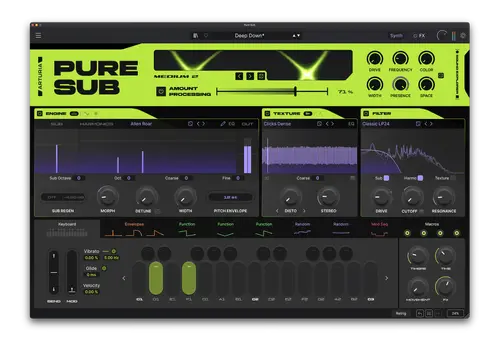 Release Date: 27/08/2026 Version: 1.0.0 Developer: Arturia | Developer Website: https://www.arturia.com Release Group: MORiA Platform: macOS (Apple Silicon M1/M2/M3/M4 and Intel Universal 2 Binary) Format: AU, VST, VST3, AAX, Standalone Bit Depth: 64-bit Crack: Included (Cured / MORiA Pre-Patched) System Requirements: OS: macOS 10.15 (Catalina) — macOS 15+ (Sequoia) Processor: Native Apple Silicon (M-series) or multi-core Intel processor (with SSE4.2 support) RAM: Minimum 4 GB RAM (8 GB recommended) Hard Drive: 1.5 GB free disk space for instrument binaries, factory content, and presets Display: Minimum screen resolution 1280 x 800 (scalable interface) Host Program: 64-bit DAW supporting AU (Audio Units), VST, VST3, or AAX 566.4 MB Description: A specialized 3-layer electronic bass synthesizer developed natively for macOS. It combines independent Sub, Harmonics, and Texture sound engines with a phase-stable Sub Regen, over 40 filter modes, an 18-effect studio rack, and advanced multi-band dynamic processing. Features and Capabilities: 3-layer synthesis engine: Separate sound generation paths for Sub (fundamental tone), Harmonics (mid-range body), and Texture (high-frequency grit and texture). Phase-stable Sub Regen: Maintains a clean, solid fundamental sine wave regardless of the intensity of harmonic saturation or stereo widening applied to the upper layers. Universal 2 Binary (U2B): High-performance native operation on both Apple Silicon (ARM64) and Intel Macs with minimal CPU load. Specialized modes for electronic bass: Designed for dense Reese basses, Trap 808s, Neurofunk growls, and textural Acid sub-lines. Over 40 filter topologies: A full-featured filter section with independent routing for each layer, analog modeling, and key-tracking modulation. Mastering maximizer section: Integrated Soft and Hard limiting modes combined with multi-band dynamics and dedicated EQs for tone shaping. MPE and microtuning support: Native MIDI Polyphonic Expression (MPE) support, including the Slide parameter, plus full integration with the MTS-ESP microtuning system. Technical Specifications and DAW Compatibility: Plugin specifications: Supported formats: AU (Audio Units 64-bit), VST2, VST3, AAX Native (64-bit), standalone application. Internal DSP: 64-bit floating-point engine. Architecture: Universal 2 Binary (native Apple Silicon ARM64 and Intel x86_64). Sample rate support: 44.1 kHz to 192 kHz. Compatible DAWs on macOS: Apple Logic Pro Ableton Live (10 / 11 / 12) Steinberg Cubase / Nuendo PreSonus Studio One Cockos REAPER Bitwig Studio Avid Pro Tools (AAX 64-bit) FL Studio macOS Installation and Setup Instructions: Installation Procedure (macOS): Mount the .dmg image or extract the downloaded archive. Run the installer package (.pkg) to install the standalone application and all plugin formats. If macOS Gatekeeper blocks the launch with an “unidentified developer” warning: Go to System Settings -> Privacy & Security. Scroll down to the “Security” section and click “Open Anyway.” Launch your DAW, rescan for plugins, and open Pure SUB. Frequently Asked Questions (FAQ): Q: Does this version run natively on Apple Silicon M1/M2/M3/M4 processors? A: Yes, the release is built as a Universal 2 Binary (U2B) and runs natively without the need for Rosetta 2. Q: Is authorization via Arturia Software Center or a license key required? A: No, the binaries have been pre-patched by the MORiA team and operate entirely in standalone (offline) mode.
 -
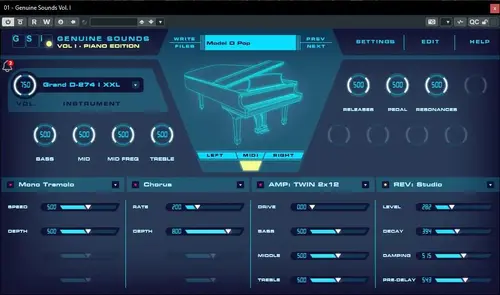
GSi Genuine Sounds Vol.I – Piano Edition v1.2.2 – PRE-ACTIVATED (VSTi, VSTi3) [WIN x64] Release Date: August 26, 2026 Version: 1.2.2 Developer: GSi Genuine Sounds Developer Website: https://www.genuinesoundware.com/?a=showproduct&b=53 Format: VSTi, VSTi3 Bit Depth: 64-bit Crack: Cracked System Requirements: Windows 10 Internet connection required to download the sample library! 43.1 MB Description: GSi Genuine Sounds is a collection of high-quality instrument samples created using GSi’s highly efficient and unique proprietary sound engine, known as WLF (Wavetable Linear Format). The WLF Engine delivers superior performance with minimal memory usage and CPU load, enabling high polyphony even on less powerful devices. All sounds included in the Genuine Sounds collections have been professionally sampled using proprietary software and hardware. Overview: With the release of Genuine Sounds Volume First, GSi is proud to introduce a new technology offering some of the finest acoustic and electric piano samples we have ever created. We look forward to continuing this momentum and releasing future collections dedicated to other instruments. Key features: Powered by the WLF engine—high-efficiency DFD (Direct-From-Disk) streaming; user-selectable streaming buffer size; disk pre-caching option to enhance streaming performance; up to 1024-voice stereo polyphony; native 32-bit processing using 32-bit sample material; stereo output with 4-band semi-parametric EQ; four effect slots; FX1 features: Mono/stereo tremolo, Auto-panner, Ring modulator, Wah-wah (pedal, LFO, dynamic), Limiter; FX2 features: Stereo chorus, 4- or 6-stage stereo phaser, Flanger, Digital delay, Analog delay; FX3 features amp simulation: TWIN, JCM, AC, RJC, BASS; FX4 features digital reverb with 9 variations; up to 8 dedicated parameters per sample set; full MIDI control via user-definable MIDI mapping and MIDI Learn functionality; sound bank manager with direct loading and the ability to delete unused sample sets; program manager supporting unlimited programs and freely assignable MIDI Program Change numbers. Import/Export of individual programs and entire banks Import/Export of user-defined MIDI maps User-defined velocity curves Resizable user interface (desktop versions only) Available as standalone and plug-in versions for Windows, macOS, and iOS (iPad only) Installation : Since the download contained nothing but the installer itself, here are a few notes in my own words. Install the plugin (VST2/VST3). Do not launch it immediately after installation! (It will ask for a key; if you did open it, just close it—that’s what happened to me, and it’s no big deal). Open it in your DAW, and it will prompt you to download the libraries. The rest is simple: it’s best to create a folder (e.g., “GenuineSounds”) beforehand at the location where you want the library downloaded and stored. Alternatively, you can just use the default location—the choice is yours. Select “Download All” or choose only the specific libraries you want. Unlike the previous release on the tracker, this version lets you control the download process and curate your own library. File Information Submitter Admin Submitted 08/30/2026 Category VSTs/VSTi View File
-
Release Date: August 26, 2026 Version: 1.2.2 Developer: GSi Genuine Sounds Developer Website: https://www.genuinesoundware.com/?a=showproduct&b=53 Format: VSTi, VSTi3 Bit Depth: 64-bit Crack: Cracked System Requirements: Windows 10 Internet connection required to download the sample library! 43.1 MB Description: GSi Genuine Sounds is a collection of high-quality instrument samples created using GSi’s highly efficient and unique proprietary sound engine, known as WLF (Wavetable Linear Format). The WLF Engine delivers superior performance with minimal memory usage and CPU load, enabling high polyphony even on less powerful devices. All sounds included in the Genuine Sounds collections have been professionally sampled using proprietary software and hardware. Overview: With the release of Genuine Sounds Volume First, GSi is proud to introduce a new technology offering some of the finest acoustic and electric piano samples we have ever created. We look forward to continuing this momentum and releasing future collections dedicated to other instruments. Key features: Powered by the WLF engine—high-efficiency DFD (Direct-From-Disk) streaming; user-selectable streaming buffer size; disk pre-caching option to enhance streaming performance; up to 1024-voice stereo polyphony; native 32-bit processing using 32-bit sample material; stereo output with 4-band semi-parametric EQ; four effect slots; FX1 features: Mono/stereo tremolo, Auto-panner, Ring modulator, Wah-wah (pedal, LFO, dynamic), Limiter; FX2 features: Stereo chorus, 4- or 6-stage stereo phaser, Flanger, Digital delay, Analog delay; FX3 features amp simulation: TWIN, JCM, AC, RJC, BASS; FX4 features digital reverb with 9 variations; up to 8 dedicated parameters per sample set; full MIDI control via user-definable MIDI mapping and MIDI Learn functionality; sound bank manager with direct loading and the ability to delete unused sample sets; program manager supporting unlimited programs and freely assignable MIDI Program Change numbers. Import/Export of individual programs and entire banks Import/Export of user-defined MIDI maps User-defined velocity curves Resizable user interface (desktop versions only) Available as standalone and plug-in versions for Windows, macOS, and iOS (iPad only) Installation : Since the download contained nothing but the installer itself, here are a few notes in my own words. Install the plugin (VST2/VST3). Do not launch it immediately after installation! (It will ask for a key; if you did open it, just close it—that’s what happened to me, and it’s no big deal). Open it in your DAW, and it will prompt you to download the libraries. The rest is simple: it’s best to create a folder (e.g., “GenuineSounds”) beforehand at the location where you want the library downloaded and stored. Alternatively, you can just use the default location—the choice is yours. Select “Download All” or choose only the specific libraries you want. Unlike the previous release on the tracker, this version lets you control the download process and curate your own library.
-
 Download This For nexus 5 Content https://www.sonic-hardcore.co.uk/files/file/61-refx-nexus-5-v510-incl-nexus-5-content-ce-vr-vsti-vst3i-aax-win-x64/?do=getNewComment
 -
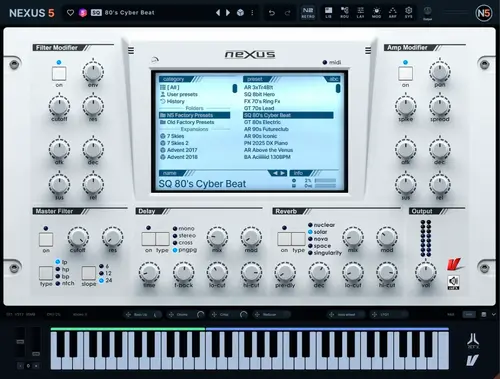
ReFX – Nexus 5 v5.1.0 Incl. Nexus 5 Content – CE-V.R (VSTi, VST3i, AAX) [WIN x64] Year/Release Date : 01.12.24 Developer : reFX. Developer’s website : reFX Format : VSTi, VSTi3, AAX. Bit depth : 64bit Tablet : cured [CE-VR] System requirements : WIN 7+ Description : Experience a synthesizer that really does it all. With cutting-edge features and unrivaled versatility, NEXUS5 is the gateway to limitless creativity. Main characteristics : Open architecture Create your own presets from scratch. Load your own samples, create your own routes, create your own extensions. Use the built-in sample editor with the ability to slice, loop and crossfade. Alternatively, and for quick results, load one of the thousands of presets available for NEXUS5 and modify them to suit your needs. The only limit is your imagination! New Factory Content Revamped beyond recognition, NEXUS5 comes with over 1,100 brand new factory presets that will take your productions to the next level! Of course, all factory presets from previous NEXUS versions are also included, bringing the total number of presets included in the standard edition of NEXUS5 to over 5,300! All modern genres are covered: EDM, Melodic Techno, House, Vintage Synths, Hip Hop, Lo-fi, Retrowave, Cyberpunk, Drum and Bass, Trance and more! Retro Skin Feeling nostalgic for simpler times when life seemed a little easier? We’ve got you covered – at least when it comes to the classic look and feel of NEXUS2. The Retro Skin is fully functional, faithfully recreates the NEXUS2 experience, and is just one click away! Whether you’re revisiting old projects or simply enjoying the charm of a familiar interface, the Retro Skin offers the perfect combination of nostalgia and functionality. Dive into the atmosphere you know and love! Introducing the Super Synthesizer Experience a synth that truly does it all. Packed with cutting-edge features and unrivaled versatility, NEXUS5 is your gateway to unlimited creativity. Unprecedented sampling power: Seamlessly import single samples, multisamples, or entire libraries. Automatic slicing and looping for simplified workflow. 8 advanced oscillators: Explore endless possibilities with virtual analog, sampler, wavetable, time stretcher, retro sampler, grain, cloud, and FM synthesis. Studio-grade effects: Dozens of effects, including the new Bucket Brigade Delay, Particle Reverb, Vowel Filter, Rotary, Pusher, and more, add depth and character to your sound. And much more! The perfect combination of power, precision, and ease of use, making it ideal for producers of all levels. Installation : WINDOWS : 1) Install Nexus 5 . From the Nexus 5 Content folder 2) Copy the tags.csv file and paste it into C:\Users\Public\Documents\reFX\NEXUS. 3) Copy the N5_Factory_Presets.svg and paste it into C:\Users\Your Username\AppData\Roaming\reFX\cloud\cache\images. 4) Copy the NKS-Presets-Samples folder to your old Nexus library! 5) Congratulations and enjoy! If you are a new Nexus user and do not have the previously released Nexus 4 libraries, simply specify the folder location of the “Nexus 5 Content” folder included in this distribution during Nexus 5 installation… You can also change the location of the Content folder by editing Settings.json in “C:\Users\Public\Documents\reFX\NEXUS” (Use a text document to edit) Example of editing the line : library_folder”: “F:\\Nexus 5 Factory Content Library\\Nexus 5 Content” Use double backslashes \\ between folder separations. File Information Submitter Admin Submitted 08/30/2026 Category VSTs/VSTi View File
-
Year/Release Date : 01.12.24 Developer : reFX. Developer’s website : reFX Format : VSTi, VSTi3, AAX. Bit depth : 64bit Tablet : cured [CE-VR] System requirements : WIN 7+ Description : Experience a synthesizer that really does it all. With cutting-edge features and unrivaled versatility, NEXUS5 is the gateway to limitless creativity. Main characteristics : Open architecture Create your own presets from scratch. Load your own samples, create your own routes, create your own extensions. Use the built-in sample editor with the ability to slice, loop and crossfade. Alternatively, and for quick results, load one of the thousands of presets available for NEXUS5 and modify them to suit your needs. The only limit is your imagination! New Factory Content Revamped beyond recognition, NEXUS5 comes with over 1,100 brand new factory presets that will take your productions to the next level! Of course, all factory presets from previous NEXUS versions are also included, bringing the total number of presets included in the standard edition of NEXUS5 to over 5,300! All modern genres are covered: EDM, Melodic Techno, House, Vintage Synths, Hip Hop, Lo-fi, Retrowave, Cyberpunk, Drum and Bass, Trance and more! Retro Skin Feeling nostalgic for simpler times when life seemed a little easier? We’ve got you covered – at least when it comes to the classic look and feel of NEXUS2. The Retro Skin is fully functional, faithfully recreates the NEXUS2 experience, and is just one click away! Whether you’re revisiting old projects or simply enjoying the charm of a familiar interface, the Retro Skin offers the perfect combination of nostalgia and functionality. Dive into the atmosphere you know and love! Introducing the Super Synthesizer Experience a synth that truly does it all. Packed with cutting-edge features and unrivaled versatility, NEXUS5 is your gateway to unlimited creativity. Unprecedented sampling power: Seamlessly import single samples, multisamples, or entire libraries. Automatic slicing and looping for simplified workflow. 8 advanced oscillators: Explore endless possibilities with virtual analog, sampler, wavetable, time stretcher, retro sampler, grain, cloud, and FM synthesis. Studio-grade effects: Dozens of effects, including the new Bucket Brigade Delay, Particle Reverb, Vowel Filter, Rotary, Pusher, and more, add depth and character to your sound. And much more! The perfect combination of power, precision, and ease of use, making it ideal for producers of all levels. Installation : WINDOWS : 1) Install Nexus 5 . From the Nexus 5 Content folder 2) Copy the tags.csv file and paste it into C:\Users\Public\Documents\reFX\NEXUS. 3) Copy the N5_Factory_Presets.svg and paste it into C:\Users\Your Username\AppData\Roaming\reFX\cloud\cache\images. 4) Copy the NKS-Presets-Samples folder to your old Nexus library! 5) Congratulations and enjoy! If you are a new Nexus user and do not have the previously released Nexus 4 libraries, simply specify the folder location of the “Nexus 5 Content” folder included in this distribution during Nexus 5 installation… You can also change the location of the Content folder by editing Settings.json in “C:\Users\Public\Documents\reFX\NEXUS” (Use a text document to edit) Example of editing the line : library_folder”: “F:\\Nexus 5 Factory Content Library\\Nexus 5 Content” Use double backslashes \\ between folder separations.
-
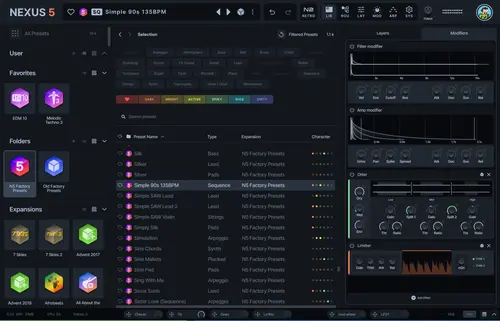
reFX – Nexus 5 v5.4.16 - UPDATE ONLY – CE-V.R (VST, VST3, AU, AAX) [WIN.OSX x64] Release Date: August 20, 2026 Version: 5.4.16 Developer: reFX Developer Website: reFX Format: VST | VST3 | AAX | AU Bit Depth: 64-bit Crack: Cracked System Requirements: Win 10+ / macOS 10.13+ | NEXUS 5 94.6 MB Description : Limitless – Update Released v5.4.16 What’s New in Nexus 5: Open Architecture Nexus is no longer just a ROMpler. Users can now: • Create presets from scratch: Full access to all engine parameters—previously reserved for official developers. • Import custom samples: Support for single samples, multisamples, and entire libraries, with automatic slicing and looping. • Create custom expansions: The ability to package your own sounds into the expansion format. New Oscillators and Synthesis Version 5 features 8 oscillator types: • Virtual Analog, Sampler, Wavetable, Time Stretcher. New additions: • Retro Sampler, Grain, Cloud, and FM. Effects and Processing New studio-grade effects added: • Bucket Brigade Delay. • Particle Reverb. • Vowel Filter and Rotary. • Pusher and Vinylizer. • HexEQ: A new 6-band equalizer. Interface and Usability • Completely redesigned: A more modern, scalable interface. • Retro Skin: A special skin that restores the classic look of the legendary Nexus 2 for those accustomed to the old design. • Improved browser: Faster search, query history, and the ability to “like” samples. Changelog: v5.4.16 [2026-08-20] • Fixed an issue where the plugin window opened with the incorrect size in FL Studio on Windows. • Fixed a hang in FL Studio when exiting on Windows. v5.4.15 [2026-08-19] • Fixed a crash caused by certain French House samples. • Fixed an issue where parallel filter blending could not be assigned as a modulation target via drag-and-drop. • Added “Loop” to the list of layer names. • The HexEQ value now defaults to 12 dB. • Fixed an issue where sound was produced using Shepard Wrap even when the oscillator volume was set to 0. Installation : Installation Options: • Clean Install – installs a new version of the plugin (v5.#.#) • Update Only – updates an older version of the plugin • Library Destination – the field where you specify the path to the Nexus Library (this option is active only when “Clean Install” is selected) Note for Mac: Default content location: /Library/Audio/Presets/reFX/NEXUS library – place the content in this directory, create a symbolic link there pointing to the library’s actual location, or edit the path in the file: /users/shared/reFX/nexus/settings.json For Nexus 5 Content download this File Information Submitter Admin Submitted 08/30/2026 Category VSTs/VSTi View File
-
Release Date: August 20, 2026 Version: 5.4.16 Developer: reFX Developer Website: reFX Format: VST | VST3 | AAX | AU Bit Depth: 64-bit Crack: Cracked System Requirements: Win 10+ / macOS 10.13+ | NEXUS 5 94.6 MB Description : Limitless – Update Released v5.4.16 What’s New in Nexus 5: Open Architecture Nexus is no longer just a ROMpler. Users can now: • Create presets from scratch: Full access to all engine parameters—previously reserved for official developers. • Import custom samples: Support for single samples, multisamples, and entire libraries, with automatic slicing and looping. • Create custom expansions: The ability to package your own sounds into the expansion format. New Oscillators and Synthesis Version 5 features 8 oscillator types: • Virtual Analog, Sampler, Wavetable, Time Stretcher. New additions: • Retro Sampler, Grain, Cloud, and FM. Effects and Processing New studio-grade effects added: • Bucket Brigade Delay. • Particle Reverb. • Vowel Filter and Rotary. • Pusher and Vinylizer. • HexEQ: A new 6-band equalizer. Interface and Usability • Completely redesigned: A more modern, scalable interface. • Retro Skin: A special skin that restores the classic look of the legendary Nexus 2 for those accustomed to the old design. • Improved browser: Faster search, query history, and the ability to “like” samples. Changelog: v5.4.16 [2026-08-20] • Fixed an issue where the plugin window opened with the incorrect size in FL Studio on Windows. • Fixed a hang in FL Studio when exiting on Windows. v5.4.15 [2026-08-19] • Fixed a crash caused by certain French House samples. • Fixed an issue where parallel filter blending could not be assigned as a modulation target via drag-and-drop. • Added “Loop” to the list of layer names. • The HexEQ value now defaults to 12 dB. • Fixed an issue where sound was produced using Shepard Wrap even when the oscillator volume was set to 0. Installation : Installation Options: • Clean Install – installs a new version of the plugin (v5.#.#) • Update Only – updates an older version of the plugin • Library Destination – the field where you specify the path to the Nexus Library (this option is active only when “Clean Install” is selected) Note for Mac: Default content location: /Library/Audio/Presets/reFX/NEXUS library – place the content in this directory, create a symbolic link there pointing to the library’s actual location, or edit the path in the file: /users/shared/reFX/nexus/settings.json For Nexus 5 Content download this
-
ReFX – Trance Voices (Nexus 4 Expansion) Publisher: reFX Website: reFX Trance Voices Format: SOUNDBANK Quality: 24 bit 44.1 kHz stereo Description: Extension for Nexus 4 Do you want your next Trance track to really “sing”? We have what you need! Peak Performance Want to make your next Trance track really “sing?” We’ve got what you need! Trance Voices delivers a complete expansion of incredible new sounds, ranging from epic arps, rolling basslines, and wide pads to leads and tons of amazing vocals. Explore an entire galaxy of professionally recorded trance hooks from every gender, all embedded in musical context with accompanying pads and basslines, to show you exactly how to use them. Of course, all vocals can also be played back and used in isolation in any track. The vocals use Nexus’ timestretch engine, so they will follow any pitch or tempo seamlessly while retaining outstanding quality. This is a true must-have! *Please note that vocals may not be used commercially. Installation : Copy the NKS, Presets, Samples folders and paste them into your main Nexus Content folder. In the Info folder there is an icon file Trance_Voices.svg – place it in C:\Users\yourusername\AppData\Roaming\reFX\cloud\cache\images File Information Submitter Admin Submitted 08/30/2026 Category Nexus View File

-
Publisher: reFX Website: reFX Trance Voices Format: SOUNDBANK Quality: 24 bit 44.1 kHz stereo Description: Extension for Nexus 4 Do you want your next Trance track to really “sing”? We have what you need! Peak Performance Want to make your next Trance track really “sing?” We’ve got what you need! Trance Voices delivers a complete expansion of incredible new sounds, ranging from epic arps, rolling basslines, and wide pads to leads and tons of amazing vocals. Explore an entire galaxy of professionally recorded trance hooks from every gender, all embedded in musical context with accompanying pads and basslines, to show you exactly how to use them. Of course, all vocals can also be played back and used in isolation in any track. The vocals use Nexus’ timestretch engine, so they will follow any pitch or tempo seamlessly while retaining outstanding quality. This is a true must-have! *Please note that vocals may not be used commercially. Installation : Copy the NKS, Presets, Samples folders and paste them into your main Nexus Content folder. In the Info folder there is an icon file Trance_Voices.svg – place it in C:\Users\yourusername\AppData\Roaming\reFX\cloud\cache\images
-
ReFX – Studio Production 3 Guitars (Nexus 4 Expansion) Publisher: reFX Website: reFX Studio Production 3 Guitars Format: SOUNDBANK Quality: 24 bit 44.1 kHz stereo Description: Extension for Nexus 4 Our Studio Production series provides professional producers with the essential sounds they rely on for their daily production needs. This time the guitars take center stage. Let Studio Production 3 be your virtual studio musician, delivering impeccable guitar sounds perfect for any genre, from hip-hop and electronic dance music to cinematic soundtracks. This extension is an essential part of every producer’s toolkit. Pluck’n’Play Our Studio Production series offers essential sounds for professional producers that they rely on for their daily production needs. This time, the spotlight is on guitars. Let Studio Production 3 become your virtual studio musician, providing impeccable guitar sounds ideal for any genre from Hip Hop and EDM to cinematic scores. This expansion is an essential in every producer’s toolbox. Installation : Copy the NKS, Presets, Samples folders and paste them into your main Nexus Content folder. File Information Submitter Admin Submitted 08/30/2026 Category Nexus View File

-
Publisher: reFX Website: reFX Studio Production 3 Guitars Format: SOUNDBANK Quality: 24 bit 44.1 kHz stereo Description: Extension for Nexus 4 Our Studio Production series provides professional producers with the essential sounds they rely on for their daily production needs. This time the guitars take center stage. Let Studio Production 3 be your virtual studio musician, delivering impeccable guitar sounds perfect for any genre, from hip-hop and electronic dance music to cinematic soundtracks. This extension is an essential part of every producer’s toolkit. Pluck’n’Play Our Studio Production series offers essential sounds for professional producers that they rely on for their daily production needs. This time, the spotlight is on guitars. Let Studio Production 3 become your virtual studio musician, providing impeccable guitar sounds ideal for any genre from Hip Hop and EDM to cinematic scores. This expansion is an essential in every producer’s toolbox. Installation : Copy the NKS, Presets, Samples folders and paste them into your main Nexus Content folder.
-
ReFX – Studio Production 2 (Nexus 4 Expansion) Publisher: reFX Website: reFX Studio Production 2 Format: SOUNDBANK Quality: 24 bit 44.1 kHz stereo Description: Expansion for Nexus 4. A real treasure trove! A true treasure trove! : Studio producers, this one’s for you! Picking up where Studio Production 1 left off, Studio Production 2 has all of the most professional, crisp, and dreamy sounds you need for any genre. Whether you’re looking for sharp electronic sounds, cinematic synths, studio guitars, classic organs, retro rhodes, or round basses, you can find it all here. Think of it as your treasure trove of lost gems just waiting to be found, so they can surprise and inspire you! This is the perfect first stop when you’re searching for “that sound” but don’t know exactly what it is yet. Installation : Copy the NKS, Presets, Samples folders and paste them into your main Nexus Content folder. File Information Submitter Admin Submitted 08/30/2026 Category Nexus View File
-
Publisher: reFX Website: reFX Studio Production 2 Format: SOUNDBANK Quality: 24 bit 44.1 kHz stereo Description: Expansion for Nexus 4. A real treasure trove! A true treasure trove! : Studio producers, this one’s for you! Picking up where Studio Production 1 left off, Studio Production 2 has all of the most professional, crisp, and dreamy sounds you need for any genre. Whether you’re looking for sharp electronic sounds, cinematic synths, studio guitars, classic organs, retro rhodes, or round basses, you can find it all here. Think of it as your treasure trove of lost gems just waiting to be found, so they can surprise and inspire you! This is the perfect first stop when you’re searching for “that sound” but don’t know exactly what it is yet. Installation : Copy the NKS, Presets, Samples folders and paste them into your main Nexus Content folder.
-
ReFX – Sound of the 70s (Nexus 4 Expansion) Publisher: reFX Website: Sound of the 70s Format: SOUNDBANK Quality: 24 bit 44.1 kHz stereo Description: Extension for Nexus 4 • • • It’s Time To Get Funky! • • • Go back to the real disco and funky era of the 1970s with our reFX Nexus extension! Immerse yourself in the unforgettable sounds that defined this iconic decade, from lush strings and soulful guitars to funky solos, authentic live drums, timeless pianos, vintage organs and classic synths. This collection captures the essence of the era, offering carefully crafted presets for producers of disco, funk, soul and, of course, modern funk house. Take your music to the next level with a retro 70s vibe and start having fun today! Installation : Copy the 3 folders from XP Sound of the 70s and paste them into your main Nexus Content folder. Anyone who doesn’t work is a loser File Information Submitter Admin Submitted 08/30/2026 Category Nexus View File

-
Publisher: reFX Website: Sound of the 70s Format: SOUNDBANK Quality: 24 bit 44.1 kHz stereo Description: Extension for Nexus 4 • • • It’s Time To Get Funky! • • • Go back to the real disco and funky era of the 1970s with our reFX Nexus extension! Immerse yourself in the unforgettable sounds that defined this iconic decade, from lush strings and soulful guitars to funky solos, authentic live drums, timeless pianos, vintage organs and classic synths. This collection captures the essence of the era, offering carefully crafted presets for producers of disco, funk, soul and, of course, modern funk house. Take your music to the next level with a retro 70s vibe and start having fun today! Installation : Copy the 3 folders from XP Sound of the 70s and paste them into your main Nexus Content folder. Anyone who doesn’t work is a loser
-
ReFX – Slap House 2 (Nexus Expansion) Year/Release Date : 05/16/2025 Developer : reFX Developer’s website : reFX Format : SOUNDBANK Compatibility : N4|N5 833.4 MB Description : It’s Slaps again! Raise your hands for Slap House 2! Listen to the hottest new Slap House sounds on the market, from Psy Slap, Shuffle Slap and Fast Slap to Night Drive and Big Room, this game has everything you need to create your next club smash. What are you waiting for? Turn your Nexus library into a hit-making machine today with Slap House 2! Extension for Nexus Thanks to comrade Lowginer for providing this extension Installation : • Move the NKS, Presets, Samples folders to the directory with your Nexus Library extensions • Copy the file with the .svg extension to the directory: WIN: C:\Users\Username\AppData\Roaming\reFX\cloud\cache\images MAC: Users/Your username/Library/Application Support\reFX\cloud\cache\images File Information Submitter Admin Submitted 08/30/2026 Category Nexus View File
-
Year/Release Date : 05/16/2025 Developer : reFX Developer’s website : reFX Format : SOUNDBANK Compatibility : N4|N5 833.4 MB Description : It’s Slaps again! Raise your hands for Slap House 2! Listen to the hottest new Slap House sounds on the market, from Psy Slap, Shuffle Slap and Fast Slap to Night Drive and Big Room, this game has everything you need to create your next club smash. What are you waiting for? Turn your Nexus library into a hit-making machine today with Slap House 2! Extension for Nexus Thanks to comrade Lowginer for providing this extension Installation : • Move the NKS, Presets, Samples folders to the directory with your Nexus Library extensions • Copy the file with the .svg extension to the directory: WIN: C:\Users\Username\AppData\Roaming\reFX\cloud\cache\images MAC: Users/Your username/Library/Application Support\reFX\cloud\cache\images
-
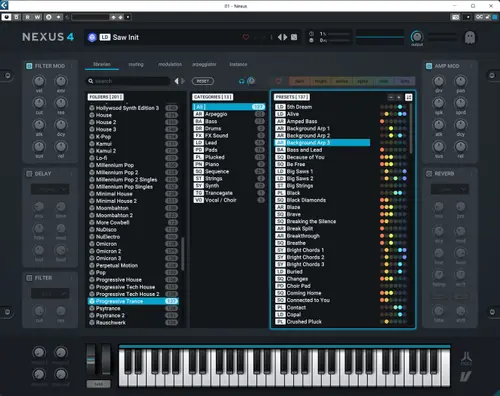
reFX – Progressive Trance (Nexus 4 Expansion) Publisher: reFX Website: reFX Format: NXS Description: Extension for Nexus 4 rompler Installation : Copy all folders from the XP Progressive Trance folder and paste into your main Nexus Content folder File Information Submitter Admin Submitted 08/30/2026 Category Nexus View File
-
Publisher: reFX Website: reFX Format: NXS Description: Extension for Nexus 4 rompler Installation : Copy all folders from the XP Progressive Trance folder and paste into your main Nexus Content folder
-
ReFX – Lo-fi 2 (Nexus 4 Expansion) Publisher: reFX Website: reFX Lo-fi 2 Format: SOUNDBANK Quality: 24 bit 44.1 kHz stereo Description: Extension for Nexus 4More crunch! Looking for amazing “raw” sounds? This expansion picks up where we left off and offers inspiring, unexpected, unique, underground and non-mainstream sounds suitable for any genre. This one is perfect for anywhere you need some grungy lo-fi mojo! Additional Information : More Crunch! Get low – and dirty – with Lo-fi 2! Looking for some wonderfully gritty, “unpolished” sounds? This expansion picks up where we left off and delivers inspiring, unexpected, unique, underground, and non-mainstream sounds suitable for any genre. This one is perfect for anywhere you need some grungy, Lo-fi mojo! Installation : Copy the NKS, Presets, Samples folders and paste them into your main Nexus Content folder. File Information Submitter Admin Submitted 08/30/2026 Category Nexus View File
-
Publisher: reFX Website: reFX Lo-fi 2 Format: SOUNDBANK Quality: 24 bit 44.1 kHz stereo Description: Extension for Nexus 4More crunch! Looking for amazing “raw” sounds? This expansion picks up where we left off and offers inspiring, unexpected, unique, underground and non-mainstream sounds suitable for any genre. This one is perfect for anywhere you need some grungy lo-fi mojo! Additional Information : More Crunch! Get low – and dirty – with Lo-fi 2! Looking for some wonderfully gritty, “unpolished” sounds? This expansion picks up where we left off and delivers inspiring, unexpected, unique, underground, and non-mainstream sounds suitable for any genre. This one is perfect for anywhere you need some grungy, Lo-fi mojo! Installation : Copy the NKS, Presets, Samples folders and paste them into your main Nexus Content folder.
-
reFX – Italo Disco (Nexus 4 Expansion) Publisher: reFX Website: ReFX Format: SOUNDBANK Quality: 24 bit 44.1 kHz stereo Description: Extension for Nexus 4 rompler If you missed this 80s chapter before, don’t miss it now! Italo Disco is perfect for transporting you to the vintage sounds of another time, where danceable electronic drums, catchy melodies, vocoders and overdubs reigned supreme. Crafted with love, passion and the original synths of the era, this add-on will make you want to light up the BA ll and BA sk disco lights! Installation : put folders in Nexus Content File Information Submitter Admin Submitted 08/30/2026 Category Nexus View File

-
Publisher: reFX Website: ReFX Format: SOUNDBANK Quality: 24 bit 44.1 kHz stereo Description: Extension for Nexus 4 rompler If you missed this 80s chapter before, don’t miss it now! Italo Disco is perfect for transporting you to the vintage sounds of another time, where danceable electronic drums, catchy melodies, vocoders and overdubs reigned supreme. Crafted with love, passion and the original synths of the era, this add-on will make you want to light up the BA ll and BA sk disco lights! Installation : put folders in Nexus Content
-
reFX – Guitars 2 (Nexus 4 Expansion) Publisher: reFX Website: reFX Guitars 2 Format: NXS Quality: 16 bit 44.1 kHz stereo Description: Extension for Nexus 4 rompler (v.4.5.13) Guitars 2 will add soul to your next creation. Whether you’re looking for heavily distorted, funky electric, nylon/acoustic, electric bass guitars, or even heavily processed ambient guitars, it’s all here. Guitars 2 is here with countless playable guitars to add soul into your next creation. No matter whether you are looking for powerfully distorted, funky electric, nylon/acoustic, electric basses, or even heavily processed ambient guitars, it’s all here. Recorded with top-notch microphones and amps, and complete with vast multisamples, velocity zones, and real life guitar fret noises, you will fall in love with this one in an instant. Installation : Copy all folders from the XP Guitars 2 folder and paste them into the main Nexus Content folder on your computer. File Information Submitter Admin Submitted 08/30/2026 Category Nexus View File